年間プランがお得年間プランで50%オフ
プランを見る
Nano Banana Pro
ホームホーム
Nano Banana Series
Nano Banana Pro
RECOMMENDED

テキストの説明から高品質な画像を生成

Nano Banana 2

次世代 · Google検索 · 14枚の入力画像

Nano Banana 2 Lite

Nano Banana 2 の軽量・高速版

GPT Image Series
GPT Image 2.5
RECOMMENDED

Natural lighting · Rich textures · Fine detail

GPT Image 2

フォトリアル品質・正確な文字描画・ピクセル単位の編集

GPT画像1.5

最新のGPT 5.2搭載画像生成

Seedream SeriesRELAXED
Seedream 5 Pro
NEW

Nano Banana 2 に匹敵する品質、精密編集・レイヤー自在

Seedream 5 Lite

最新Seedreamモデル、4K画質、8つのアスペクト比

Seedream 4.0

4K対応、緩和されたコンテンツポリシー、一括生成

Qwen Image
Qwen Image 3.0

複雑な図文レイアウト · 鮮明な文字描画 · 繊細な写実表現

Creative Tools
画像強化

解像度を高め、細部を洗練

Eコマース画像セット

商品画像をアップロードして、主要モール向けの画像セットを生成

Nano Banana Pro コンボ

1回のAPIコールでマルチカードグリッドを生成

GPT Image 2 コンボ

GPT Image 2 で複数カードのグリッドを一度に生成

Z-Image
Z-イメージ

高速フォトリアル生成と緩やかなコンテンツポリシー

Seedance Series
Seedance 2.5
NEW

30秒・4K動画生成、ネイティブ音声、高度な制御に対応

Seedance 2
HOT

ネイティブオーディオ付きシネマ品質動画、最大15秒、テキスト&画像から動画生成

Seedance 2 Mini
HOT

High-value Seedance 2 with native audio, 4-15s, 720p/1080p

Seedance 1.5 Pro

ネイティブオーディオを伴うシネマティックな4K生成

Kling Series
Kling 3
HOT

Cinematic 4K generation with native audio

Kling o3

シネマティック品質とネイティブオーディオ生成

Kling 2.6

シネマティック品質とネイティブオーディオ生成

Wan Series
Wan 3.0
NEW

標準と高速 Prime を同じワークスペースで

Wan 2.7
HOT

テキスト、画像、参照、動画編集モード

Wan 2.6

緩やかなコンテンツポリシー

Wan 2.5

緩やかなコンテンツポリシーで高い創作自由度を維持

Google Series
Gemini Omni

マルチモーダル入力 × ネイティブ音声、映画級の制御可能な動画生成

Veo 3.1

先頭/末尾フレーム動画、複数画像参照動画生成に対応

Grok Series
Grok Imagine 1.5

xAI Grok 画像から動画生成、柔軟なアスペクト比、最大15秒

Grok

生成速度が速く、プロンプトへの忠実度は低め、スパイシーモードに対応

Hailuo AI Series
H3 Max / Turbo

テキストからビデオ、画像からビデオ、およびネイティブ オーディオを使用したリファレンス主導の作成のための、コスト効率の高い MiniMax H3 Max スタジオ。

MiniMax H3(Hailuo 03)

テキスト、開始・終了フレーム、マルチモーダル参照に対応するHailuo 03

Hailuo AI

初回/最終フレーム制御を備えたオムニモデル

OmniHuman 1.5
OmniHuman 1.5

1枚の画像と音声からデジタルヒューマン動画を生成

V2V Lip Sync

既存動画の口の動きをターゲット音声に同期

AIチャット
AI Audio
NEW

Generate dialogue, ambience, sound effects, and background music

AI音楽
NEW

カスタム歌詞とスタイルでオリジナル楽曲を生成

クリエーションズクリエーションズ
料金料金
プロンプトライブラリ

高品質なAIプロンプトを探索して発見する

Nano Banana プロンプト事例

Nano Banana Pro の高品質なプロンプト事例を探索

GPT Image 2 プロンプト事例
NEW

SNS投稿・ポスター・商品ビジュアル向けの GPT Image 2 プロンプトを閲覧

Seedance 2.0 動画プロンプト例

動画、作者、公開日、エンゲージメント指標付きの厳選された Seedance 2.0 動画プロンプト例を閲覧できます。

プロンプト作成

プロンプト作成のツールとガイド

AI画像プロンプトビルダー
NEW

視覚的なインターフェースで複雑なプロンプトを簡単に構築

Seedance 2 プロンプトガイド

高度な機能とベストプラクティスを深く掘り下げる

API
NEW

Nano Banana Proの機能をアプリケーションに統合する

Nano Banana Pro
AI ImageAI Video

Nano Banana Pro

Nano Banana Proは、優れたパフォーマンスで一貫したキャラクター編集とシーン保存を実現する革新的なAI搭載の画像生成・編集プラットフォームです。

Email: support@nanobananapro.site

  • Email

製品

  • ホーム
  • 機能
  • ショーケース
  • 料金
  • Eコマース

その他のサービス

  • AI画像アップスケーラー
  • Grok
  • Veo 3.1
  • Wan 2.5
  • Kling 4.0

その他

  • ブログ
  • 私たちについて
  • 気候アクション計画

© 2026 bananapro.site. 無断転載を禁じます。

  • プライバシーポリシー
  • 利用規約
  • 返金ポリシー
  • Referral Program
  • Invoice Management
🇺🇸 English🇨🇳 中文🇰🇷 한국어🇯🇵 日本語🇪🇸 Español🇩🇪 Deutsch🇫🇷 Français🇷🇺 Русский🇸🇦 العربية🇧🇷 Português🇮🇹 Italiano
料金作成
GPT Image 2 プロンプトへ戻る
ホームGPT Image 2 プロンプトCute Google Fonts Tutorial Infographic
インフォグラフィック / 教育ビジュアルイラストミニマリズムテキスト / タイポグラフィ図解 / チャート

Cute Google Fonts Tutorial Infographic

Cute Google Fonts Tutorial Infographic preview image 1

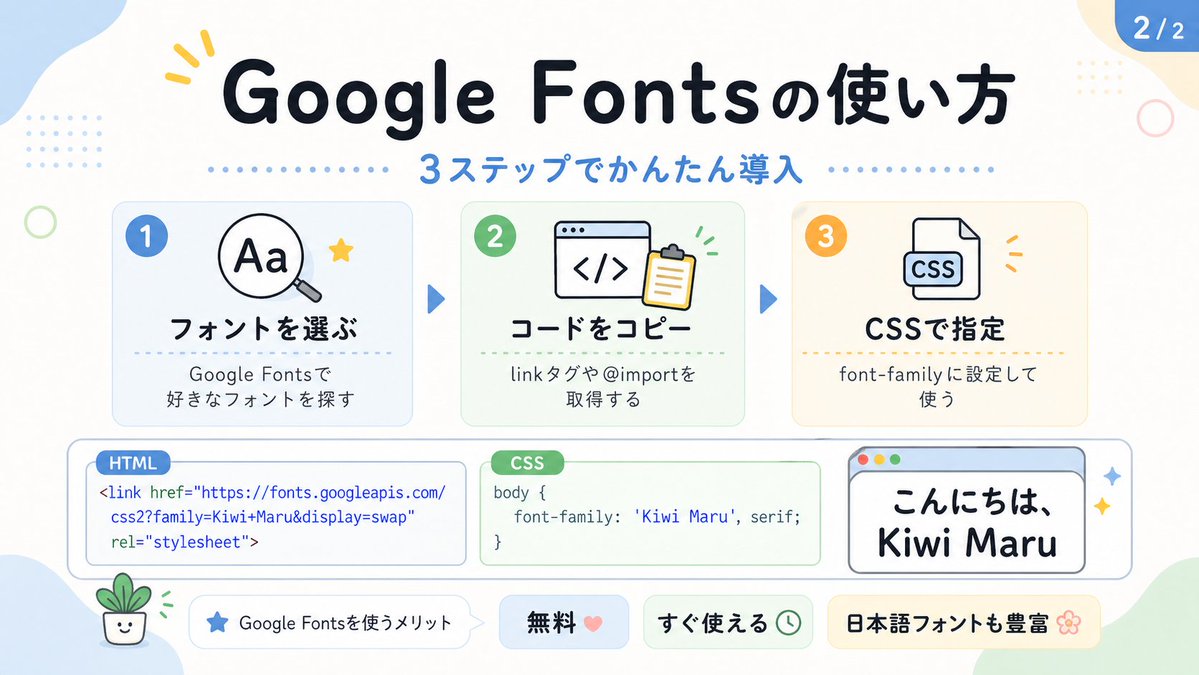
This prompt generates a pastel Japanese educational infographic slide explaining Google Fonts setup in three steps, suitable for social media carousels or tech tutorial posts.

公開日 2026年4月28日元の言語: EN

プロンプト

全文プロンプト。コピーや編集にそのまま使えます。

Create a cute pastel Japanese infographic slide with a clean white background and soft rounded abstract corner blobs in pale blue, cream, and light green. The design is friendly, educational, and modern, with thick rounded sans-serif Japanese typography, subtle drop shadows, thin gray outlines, dotted divider accents, and small decorative doodles. At the top center, place a large bold headline in dark navy that reads "Google Fontsの使い方". Directly below it, add a blue subheadline reading "3ステップでかんたん導入" with a horizontal row of small blue dots on both sides. In the top right corner, add a rounded blue page badge that reads "2/2".

Arrange 3 rounded rectangular step cards across the upper middle row, evenly spaced left to right, each with a pale tinted background, soft border, and a colored circular number badge in the upper left. Card 1 has a pale blue background and a blue badge with "1". Inside, show a simple magnifying glass icon over the letters "Aa" plus a small yellow star accent. The bold title reads "フォントを選ぶ" and the smaller text below reads "Google Fontsで
好きなフォントを探す". Card 2 has a pale green background and a green badge with "2". Inside, show a browser window icon with code brackets "</>" and a clipboard, plus tiny green motion marks. The bold title reads "コードをコピー" and the smaller text below reads "linkタグや@importを
取得する". Card 3 has a pale cream background and an orange badge with "3". Inside, show a document icon labeled "CSS" with small orange accent marks. The bold title reads "CSSで指定" and the smaller text below reads "font-family に設定して
使う". Place 2 medium blue triangular arrows between the 3 cards to show progression.

Across the lower middle, create 3 horizontally aligned demo boxes. The left box is a rounded white code panel with a small blue tab label reading "HTML". Inside, display this code in blue text exactly across 3 lines: "<link href=\"https://fonts.googleapis.com/"
"css2?family=Kiwi+Maru&display=swap"
"rel=\"stylesheet\">". The center box is a rounded white code panel with a green tab label reading "CSS". Inside, display dark text exactly as: "body {"
"    font-family: 'Kiwi Maru', serif;"
"}". The right box is a rounded white mock browser window with a pale blue title bar and 3 tiny circular window buttons at top left in red, yellow, and green. Inside, show large Japanese sample text in black reading "こんにちは、
Kiwi Maru" in a cute rounded handwritten-style font. Add 2 small sparkle accents to the right of this browser window.

At the bottom, place 4 pill-shaped badges from left to right. Badge 1 is white with a small blue star icon and text "Google Fontsを使うメリット". Badge 2 is pale blue with bold text "無料" followed by a pink heart. Badge 3 is pale green with bold text "すぐ使える" followed by a small clock icon. Badge 4 is pale yellow with bold text "日本語フォントも豊富" followed by a flower icon.

Add 4 extra decorative elements around the canvas: a yellow 3-stroke sparkle near the top left of the headline, a pale blue dotted square grid in the upper left background, a thin light green ring on the left side, and a tiny smiling potted plant illustration in the lower left corner. Keep the whole composition flat vector-like, crisp, cute, and highly legible, in a social-media educational carousel style.

作成者

H

HANDBALL ZIN|AI CREATOR

詳細

公開日
2026年4月28日
言語
EN
モデル
GPT Image 2
インフォグラフィック / 教育ビジュアルイラストミニマリズムテキスト / タイポグラフィ図解 / チャート

エンゲージメント

いいね
561
閲覧数
123.1k
シェア
50
コメント
6
保存
946
引用
6

プロンプト操作

GPT Image 2 の関連プロンプト

同じモデルとカテゴリの関連プロンプトです。

すべてのプロンプトを見る
Educational Infographic on Atmospheric Circulation preview image 1

WY 作

Educational Infographic on Atmospheric Circulation

インフォグラフィック / 教育ビジュアル · イラスト · ミニマリズム · 図解 / チャート

2k413.1k
Museum Style Infographic Breakdown preview image 1

Larus Canus 作

Museum Style Infographic Breakdown

インフォグラフィック / 教育ビジュアル · イラスト · ミニマリズム · ファッションアイテム

1.1k63.2k
Mathematical Visualization Infographic Prompt preview image 1

宝玉 作

Mathematical Visualization Infographic Prompt

インフォグラフィック / 教育ビジュアル · イラスト · ミニマリズム · 図解 / チャート
86696.6k
Pet Brand Identity System Board preview image 1

沐阳 作

Pet Brand Identity System Board

インフォグラフィック / 教育ビジュアル · 商品マーケティング · イラスト · ミニマリズム
723147.4k
Google Fonts Japanese Tutorial Infographic preview image 1

HANDBALL ZIN|AI CREATOR 作

Google Fonts Japanese Tutorial Infographic

インフォグラフィック / 教育ビジュアル · イラスト · ミニマリズム · テキスト / タイポグラフィ
547123.1k
Minimalist Educational Infographic Template preview image 1

知识分享官 作

Minimalist Educational Infographic Template

インフォグラフィック / 教育ビジュアル · ミニマリズム · イラスト · 図解 / チャート

39423.5k