Vorteile im Jahresplan50% sparen mit einem Jahresplan
Tarife ansehen
Nano Banana Pro
StartseiteStartseite
Nano Banana Series
Nano Banana Pro
RECOMMENDED

Erstellen Sie hochwertige Bilder aus Textbeschreibungen

Nano Banana 2

Nächste Gen · Google-Suche · 14 Eingabebilder

Nano Banana 2 Lite

Leichte und schnelle Version von Nano Banana 2

GPT Image Series
GPT Image 2.5
RECOMMENDED

Natural lighting · Rich textures · Fine detail

GPT Image 2

Fotorealistisch · präziser Text · pixelgenaue Bearbeitung

GPT Bild 1.5

Neueste Bildgenerierung mit GPT 5.2

Seedream SeriesRELAXED
Seedream 5 Pro
NEW

Auf Augenhöhe mit Nano Banana 2, präzise Bearbeitung mit Ebenenkontrolle

Seedream 5 Lite

Neuestes Seedream-Modell, 4K-Qualität, 8 Seitenverhältnisse

Seedream 4.0

4K-Unterstützung, gelockerte Inhaltsrichtlinien, Stapelgenerierung

Qwen Image
Qwen Image 3.0

Komplexe Layouts · Klare Textdarstellung · Feiner Realismus

Creative Tools
Bildverbesserung

Bildauflösung verbessern, Details verfeinern

E-Commerce-Bildersuite

Produktbild hochladen und komplette Sets für große Marktplätze erstellen

Nano Banana Pro Combo

Mehrkarten-Raster in einem Aufruf generieren

GPT Image 2 Combo

Mehrkarten-Raster mit GPT Image 2 generieren

Z-Image
Z-Bild

Schnelle fotorealistische Erzeugung mit flexibler Inhaltsrichtlinie

Seedance Series
Seedance 2.5
NEW

30-Sekunden-4K-Videos mit nativem Audio und erweiterten Steuerungen

Seedance 2
HOT

Kinoqualität-Video mit nativem Audio, bis zu 15s, Text & Bild zu Video

Seedance 2 Mini
HOT

High-value Seedance 2 with native audio, 4-15s, 720p/1080p

Seedance 1.5 Pro

Kinematografische 4K-Erzeugung mit nativer Audiowiedergabe

Kling Series
Kling 3
HOT

Cinematic 4K generation with native audio

Kling o3

Kinematische Qualität mit nativer Audiogenerierung

Kling 2.6

Kinematische Qualität mit nativer Audiogenerierung

Wan Series
Wan 3.0
NEW

Standard und schnelles Prime in einem Workspace

Wan 2.7
HOT

Text-, Bild-, Referenz- und Video-Edit-Modi

Wan 2.6

Entspannte Inhaltsrichtlinien

Wan 2.5

Lockere Inhaltsrichtlinie mit hoher kreativer Freiheit

Google Series
Gemini Omni

Multimodale Eingabe × nativer Audio, kinoreife kontrollierbare Videogenerierung

Veo 3.1

Unterstützt die Generierung von Videos mit Referenzvideos aus erstem/letztem Frame sowie mit mehreren Bildern.

Grok Series
Grok Imagine 1.5

Bild-zu-Video von xAI Grok, flexible Seitenverhältnisse, bis zu 15 s

Grok

Schnellere Erzeugung, geringere Prompt-Treue, unterstützt Spicy-Modus.

Hailuo AI Series
H3 Max / Turbo

Ein kosteneffizientes MiniMax H3 Max-Studio für Text-zu-Video, Bild-zu-Video und referenzbasierte Erstellung mit nativem Audio.

MiniMax H3 (Hailuo 03)

Hailuo 03 mit Text, Start-/Endbild und multimodalen Referenzen

Hailuo AI

Omni-Modell mit First/Last-Frame-Steuerung

OmniHuman 1.5
OmniHuman 1.5

Ein Bild plus Audio zu Digital-Human-Video

V2V Lip Sync

Synchronisiert Mundbewegungen im Video mit Zielaudio

KI-Chat
AI Audio
NEW

Generate dialogue, ambience, sound effects, and background music

KI-Musik
NEW

Erstellen Sie originelle Songs mit individuellen Texten und Stilen

KreationenKreationen
PreisePreise
Prompt-Bibliothek

Hochwertige KI-Prompts erkunden und entdecken

Nano Banana Prompt-Beispiele

Hochwertige Prompt-Beispiele für Nano Banana Pro entdecken

GPT Image 2 Prompt-Beispiele
NEW

GPT Image 2 Prompts für Social Posts, Poster und Produktvisuals durchstöbern

Seedance 2.0 Videoprompt-Beispiele

Durchsuche kuratierte Seedance 2.0 Videoprompt-Beispiele mit Videos, Autoren, Veröffentlichungsdaten und Kennzahlen.

Prompt-Toolkit

Tools und Guides zum Erstellen von Prompts

KI-Bildprompt-Generator
NEW

Komplexe Prompts einfach über eine visuelle Schnittstelle erstellen

Seedance 2 Prompt-Guide

Tief in erweiterte Funktionen und Best Practices eintauchen

API
NEW

Integrieren Sie Nano Banana Pro-Funktionen in Ihre Anwendungen

Nano Banana Pro
AI ImageAI Video

Nano Banana Pro

Nano Banana Pro ist die revolutionäre KI-gestützte Plattform für Bildgenerierung und -bearbeitung, die konsistente Charakterbearbeitung und Szenenerhaltung mit überlegener Leistung liefert.

Email: support@nanobananapro.site

  • E-Mail

Produkt

  • Startseite
  • Funktionen
  • Galerie
  • Preise
  • Ecommerce

Weitere Dienste

  • KI-Bildverbesserer
  • Grok
  • Veo 3.1
  • Wan 2.5
  • Kling 4.0

Sonstiges

  • Blog
  • Über Uns
  • Klimaschutz-Plan

© 2026 bananapro.site. Alle Rechte vorbehalten.

  • Datenschutzrichtlinie
  • Nutzungsbedingungen
  • Rückerstattungsrichtlinie
  • Referral Program
  • Invoice Management
🇺🇸 English🇨🇳 中文🇰🇷 한국어🇯🇵 日本語🇪🇸 Español🇩🇪 Deutsch🇫🇷 Français🇷🇺 Русский🇸🇦 العربية🇧🇷 Português🇮🇹 Italiano
PreiseErstellen
Zurueck zu GPT Image 2 Prompts
StartseiteGPT Image 2 PromptsCute Google Fonts Tutorial Infographic
Infografik / LernvisualIllustrationMinimalismusText / TypografieDiagramm / Chart

Cute Google Fonts Tutorial Infographic

Cute Google Fonts Tutorial Infographic preview image 1

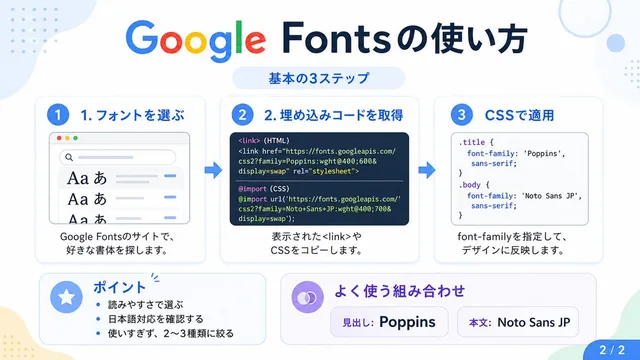
This prompt generates a pastel Japanese educational infographic slide explaining Google Fonts setup in three steps, suitable for social media carousels or tech tutorial posts.

Veroeffentlicht am 28. April 2026Originalsprache: EN

Prompt

Vollstaendiger Prompt-Text, bereit zum Kopieren oder Anpassen.

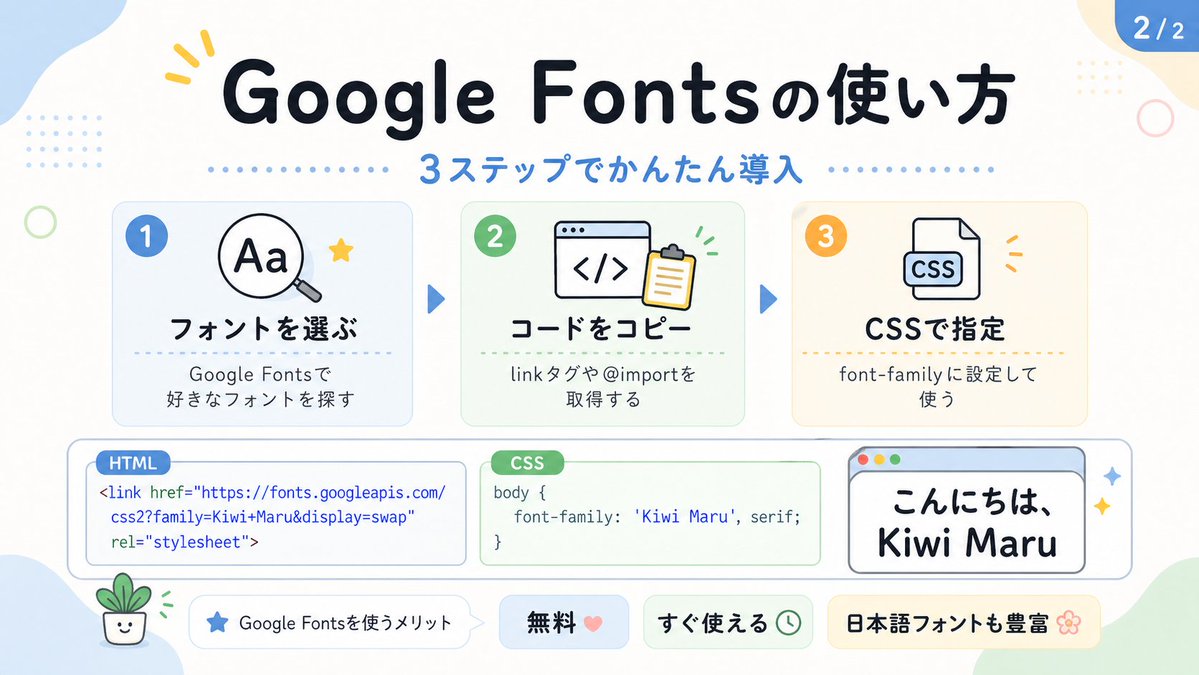
Create a cute pastel Japanese infographic slide with a clean white background and soft rounded abstract corner blobs in pale blue, cream, and light green. The design is friendly, educational, and modern, with thick rounded sans-serif Japanese typography, subtle drop shadows, thin gray outlines, dotted divider accents, and small decorative doodles. At the top center, place a large bold headline in dark navy that reads "Google Fontsの使い方". Directly below it, add a blue subheadline reading "3ステップでかんたん導入" with a horizontal row of small blue dots on both sides. In the top right corner, add a rounded blue page badge that reads "2/2".

Arrange 3 rounded rectangular step cards across the upper middle row, evenly spaced left to right, each with a pale tinted background, soft border, and a colored circular number badge in the upper left. Card 1 has a pale blue background and a blue badge with "1". Inside, show a simple magnifying glass icon over the letters "Aa" plus a small yellow star accent. The bold title reads "フォントを選ぶ" and the smaller text below reads "Google Fontsで
好きなフォントを探す". Card 2 has a pale green background and a green badge with "2". Inside, show a browser window icon with code brackets "</>" and a clipboard, plus tiny green motion marks. The bold title reads "コードをコピー" and the smaller text below reads "linkタグや@importを
取得する". Card 3 has a pale cream background and an orange badge with "3". Inside, show a document icon labeled "CSS" with small orange accent marks. The bold title reads "CSSで指定" and the smaller text below reads "font-family に設定して
使う". Place 2 medium blue triangular arrows between the 3 cards to show progression.

Across the lower middle, create 3 horizontally aligned demo boxes. The left box is a rounded white code panel with a small blue tab label reading "HTML". Inside, display this code in blue text exactly across 3 lines: "<link href=\"https://fonts.googleapis.com/"
"css2?family=Kiwi+Maru&display=swap"
"rel=\"stylesheet\">". The center box is a rounded white code panel with a green tab label reading "CSS". Inside, display dark text exactly as: "body {"
"    font-family: 'Kiwi Maru', serif;"
"}". The right box is a rounded white mock browser window with a pale blue title bar and 3 tiny circular window buttons at top left in red, yellow, and green. Inside, show large Japanese sample text in black reading "こんにちは、
Kiwi Maru" in a cute rounded handwritten-style font. Add 2 small sparkle accents to the right of this browser window.

At the bottom, place 4 pill-shaped badges from left to right. Badge 1 is white with a small blue star icon and text "Google Fontsを使うメリット". Badge 2 is pale blue with bold text "無料" followed by a pink heart. Badge 3 is pale green with bold text "すぐ使える" followed by a small clock icon. Badge 4 is pale yellow with bold text "日本語フォントも豊富" followed by a flower icon.

Add 4 extra decorative elements around the canvas: a yellow 3-stroke sparkle near the top left of the headline, a pale blue dotted square grid in the upper left background, a thin light green ring on the left side, and a tiny smiling potted plant illustration in the lower left corner. Keep the whole composition flat vector-like, crisp, cute, and highly legible, in a social-media educational carousel style.

Ersteller

H

HANDBALL ZIN|AI CREATOR

Details

Veroeffentlicht
28. April 2026
Sprache
EN
Modell
GPT Image 2
Infografik / LernvisualIllustrationMinimalismusText / TypografieDiagramm / Chart

Engagement

Gefällt mir
561
Aufrufe
123.1k
Geteilt
50
Kommentare
6
Lesezeichen
946
Zitate
6

Prompt-Aktionen

Mehr von GPT Image 2

Verwandte Prompts aus demselben Modell und denselben Kategorien.

Alle Prompts ansehen
Educational Infographic on Atmospheric Circulation preview image 1

Von WY

Educational Infographic on Atmospheric Circulation

Infografik / Lernvisual · Illustration · Minimalismus · Diagramm / Chart

2k413.1k
Museum Style Infographic Breakdown preview image 1

Von Larus Canus

Museum Style Infographic Breakdown

Infografik / Lernvisual · Illustration · Minimalismus · Modeartikel

1.1k63.2k
Mathematical Visualization Infographic Prompt preview image 1

Von 宝玉

Mathematical Visualization Infographic Prompt

Infografik / Lernvisual · Illustration · Minimalismus · Diagramm / Chart
86696.6k
Pet Brand Identity System Board preview image 1

Von 沐阳

Pet Brand Identity System Board

Infografik / Lernvisual · Produktmarketing · Illustration · Minimalismus
723147.4k
Google Fonts Japanese Tutorial Infographic preview image 1

Von HANDBALL ZIN|AI CREATOR

Google Fonts Japanese Tutorial Infographic

Infografik / Lernvisual · Illustration · Minimalismus · Text / Typografie

547123.1k
Minimalist Educational Infographic Template preview image 1

Von 知识分享官

Minimalist Educational Infographic Template

Infografik / Lernvisual · Minimalismus · Illustration · Diagramm / Chart

39423.5k